Print That People Can Write On: Practical Design for Businesses in Jordan
Many printed items need a handwritten addition after production: an appointment on a business card, a recipient’s name on a bag, an order number on a sticker, or a note on an invoice. Good design needs to support these everyday tasks. When ordering writable print in Jordan, consider who will fill it in and what they will use, alongside the finished appearance. These steps will help you prepare a clear brief for Emtiaz Al Fan printing company in Russeifa, Zarqa, whether your business is in Amman or elsewhere in Jordan.
Start with the moment someone writes
Picture an employee filling in the item during a normal working day. Are they writing at a desk or holding a card in their hand? Will they add one word or a description that needs two lines? Will they read it later themselves or pass it to a colleague? These answers guide the position, size and sequence of fields, revealing details that are easy to miss in an empty design on screen.
Collect handwritten examples of the information you expect, even on plain paper. A long name, an order number and a realistic note are more useful than short placeholder text. If several employees will use the item, ask them to complete the mockup. Different handwriting sizes will show whether the space works comfortably for everyone or needs adjustment.
Separate fixed information from handwritten fields
Print the information that repeats and reserve clear spaces for details that change. The business name and contact number can stay in print, while appointment or recipient details are added by hand. This reduces repetitive writing and makes variable information easier to find later, especially when a document passes between several people.
- Keep each field label close to its writing area so it cannot be confused with another line.
- Give names and descriptions more room than short entries such as quantities or dates.
- Arrange fields in the order people complete them at work, then test that sequence in practice.
- Allow room for expected notes so users do not have to write over the logo.
Avoid dividing the available space into numerous boxes simply because the layout looks orderly. A field your team never uses takes room away from more useful information. Similarly, a tiny box labelled “Notes” will not help if typical notes include an order description and amendments. Review what people actually write first.
Discuss the writing surface and finish
A paper name or finish description alone does not establish whether a surface suits handwriting. Tell the printing company that users will add details with a pen, and specify the usual pen type where possible. Discuss the material and surface coating in the writing area, rather than deciding from a product photograph or its feel alone.
Test the pen people use every day
Write words and numbers on a sample matching the proposed specifications, then handle it normally: hold it, place it with other papers, and check that the writing remains clear. If employees use different pens, test those too. The aim is to assess the actual combination of surface, pen and handling before approving it.
Plan a separate space for the stamp
If the item needs a stamp, reserve an area that fits its dimensions and keeps it separate from handwritten details. Test the actual stamp and check that its impression is clear without covering an important number. A successful pen test does not replace a stamp test: each uses a different tool, ink and application method.
Adapt the approach to each printed item
For business cards, a section on the reverse may be enough for a contact person’s name or a follow-up appointment. When discussing a matte business card, explain this requirement early and ask to check whether its surface suits handwriting. Keep contact details clear of the area that will be filled in with a pen.
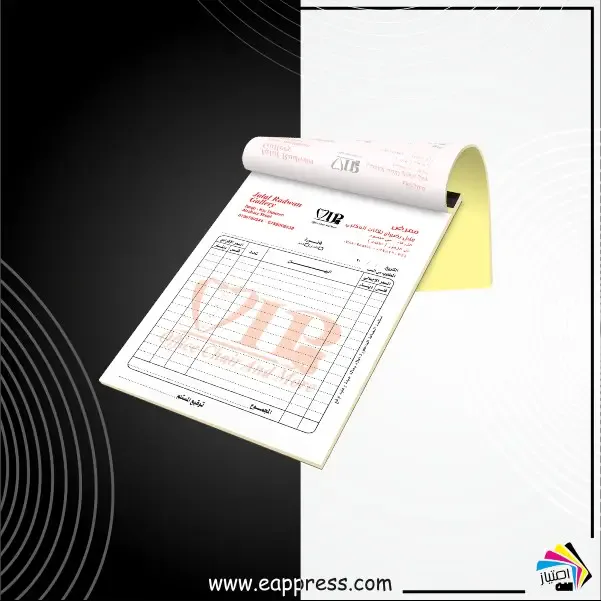
For invoices and receipts, balance the number of entries against line height and description space. Test an invoice with a reasonably long description, rather than using only abbreviated item names. If you need multiple copies, discuss how the form will be completed and check that the required copies show the information clearly.
For labels and stickers, establish whether writing happens before or after application. Test the label on its intended container, as a field may become awkward to reach once attached. On bags, choose an accessible position away from folds and handles, and test writing at the usual stage of packing.
The same principle applies to wedding invitations when guests’ names are added by hand. Leave a generous space that fits the design, and try longer names and family invitation wording before finalising it. One short name will not represent every entry you need to write.
Review a full-size mockup
Spaces that look generous on an enlarged screen can feel cramped when you hold the printed item. Use a full-size copy to review the field layout, and treat this separately from material testing. An office printout helps assess the available space, but it does not establish how a pen will behave on the final finish.
- Complete every field to see how crowded the item becomes in use.
- Try a long example in each field where information length may vary.
- Apply the stamp in its proposed position and check the surrounding space.
- Ask someone else to read the completed mockup without a verbal explanation.
- Adjust confusing fields, then test the areas you changed.
Prepare a brief that explains the workflow
Send the item type, dimensions, quantity and fixed information, together with an example showing the handwritten fields. Explain whether writing takes place before or after packing, and whether the item needs a stamp or signature. These details give the designer a practical basis for allocating space and help the printing company discuss suitable options, beyond a general request for paper that is easy to write on.
For business cards, invoices, stickers, bags and wedding invitations with thoughtfully planned writing areas in Jordan, contact Emtiaz Al Fan printing company in Russeifa, Zarqa. Send your sample and design requirements from Amman or any other city in Jordan via WhatsApp at +962 7 9821 5060 to discuss your order.
Frequently Asked Questions
Can you write on any matte business card?
How much space should handwritten fields have?
Should a sticker be filled in before or after application?
What should I send when requesting writable print?
Need printing or advertising services in Jordan?
Contact EAPPress today for a free quote on your project in Amman and across Jordan.